You didn’t get into radio to fix logs.

Songs that move through the dayparts as you planned. None overplayed, none underplayed. A schedule that’s ready to air: no unscheduled positions, no editing afterwards. That’s how MusicOne gives you time back for what you love: the music.

Free for 30 days. No credit card, nothing to cancel.

40+ years of music scheduling experience

Runs in your browser and on iOS and Android.

Works with your automation software.

How good is your music scheduler, really?

Each edit takes a minute. Your rotation pays for it later.

If your music scheduler leaves an unscheduled position, any song you fill it with is pulled out of its planned place in the rotation. And because everything around it is already scheduled, it rarely fits its neighbours either, so you move those too. You don’t see the damage until later, in your rotations and spins.

Erratic rotations.

Titles repeat in the same hours on consecutive days, or skip dayparts. Say your Recurrents are planned to rotate in 19 hours, appearing in each of the dayparts before they repeat. Fill an unscheduled Recurrent slot by hand, and every song fails the daypart rotation rule. Whatever you put in breaks the plan.

Erratic rotations.

Titles repeat in the same hours on consecutive days, or skip dayparts. Say your Recurrents are planned to rotate in 19 hours, appearing in each of the dayparts before they repeat. Fill an unscheduled Recurrent slot by hand, and every song fails the daypart rotation rule. Whatever you put in breaks the plan.

Uneven spins.

Songs that fit most rules get picked again and again, while hard-to-schedule songs get played too little. That matters more than it seems: smart programmers manage song exposure by day, week and month. Plan your Medium Currents for 35 spins a week. If some get 29 and others 40, you’ve lost control of your inventory.

Uneven spins.

Songs that fit most rules get picked again and again, while hard-to-schedule songs get played too little. That matters more than it seems: smart programmers manage song exposure by day, week and month. Plan your Medium Currents for 35 spins a week. If some get 29 and others 40, you’ve lost control of your inventory.

Broken rules double the work.

Some schedulers are allowed to break rules instead of leaving a slot empty, even rules never meant to be broken. That leaves you more to fix, not less. For every problem slot you move two songs: the one in the slot, and another one you find to replace it. Your editing time doubles.

Broken rules double the work.

Some schedulers are allowed to break rules instead of leaving a slot empty, even rules never meant to be broken. That leaves you more to fix, not less. For every problem slot you move two songs: the one in the slot, and another one you find to replace it. Your editing time doubles.

Every hour spent fixing the log is an hour not spent on the music.

The answer

Same decision. Made at the right moment.

Interactive Scheduling never leaves an unscheduled position. If no song fits without breaking a rule, or a song moves too far from its planned rotation, MusicOne pauses right there. You choose the best candidate from the songs intended to play there. The rest of the day isn’t scheduled yet, so it simply adapts to your choice. No editing afterwards.
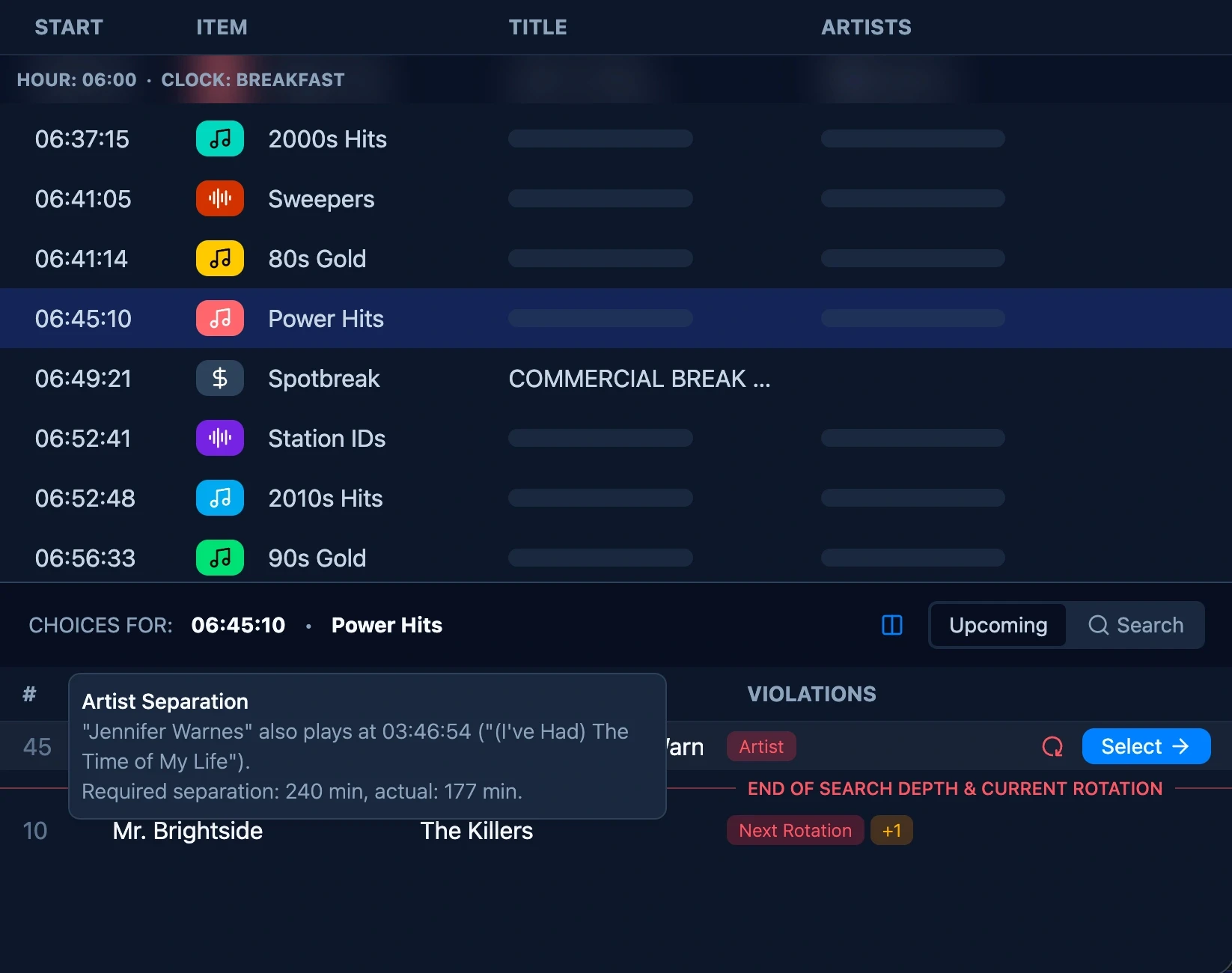
Choices for 13:25:29: candidate songs with the rules they would break, last plays and the end of the search depth

How it works

Your rotation is the plan. MusicOne sticks to it.

Here’s how MusicOne schedules a day.

Step 1 of 4

Rotations define the intent.

Your clocks and categories set how you want your songs to rotate: how often each song plays and how it spreads across the dayparts. Every scheduling decision MusicOne makes starts from that plan.

Step 1 of 4

Rotations define the intent.

Your clocks and categories set how you want your songs to rotate: how often each song plays and how it spreads across the dayparts. Every scheduling decision MusicOne makes starts from that plan.

Step 2 of 4

Rules define the boundaries.

Unbreakable rules protect your sound, like never playing the same artist back to back. Breakable rules shape your music flow, like spreading gender and tempo. MusicOne only breaks those to keep your rotation on plan.

Step 3 of 4

The engine learns your station.

MusicOne learns which songs are hard to schedule at your station and prioritises placing them, without moving them outside their planned rotation. So hard-to-schedule songs aren’t underplayed.

Step 4 of 4

You decide. The schedule adapts.

When no song fits your rotation and rules, MusicOne pauses and you choose. The log finishes clean: songs where your rotation planned them, none overplayed, none underplayed, nothing to fix.

Step 1 of 4

Rotations define the intent.

Your clocks and categories set how you want your songs to rotate: how often each song plays and how it spreads across the dayparts. Every scheduling decision MusicOne makes starts from that plan.

Step 2 of 4

Rules define the boundaries.

Unbreakable rules protect your sound, like never playing the same artist back to back. Breakable rules shape your music flow, like spreading gender and tempo. MusicOne only breaks those to keep your rotation on plan.

Step 3 of 4

The engine learns your station.

MusicOne learns which songs are hard to schedule at your station and prioritises placing them, without moving them outside their planned rotation. So hard-to-schedule songs aren’t underplayed.

Step 4 of 4

You decide. The schedule adapts.

When no song fits your rotation and rules, MusicOne pauses and you choose. The log finishes clean: songs where your rotation planned them, none overplayed, none underplayed, nothing to fix.

Placeholder: app screen

Placeholder (9:19.5): MusicOne app with an Interactive Scheduling pause open

Runs in the cloud

Built for the cloud from day one.

MusicOne runs in the cloud, built for the browser from the ground up. Not a workaround that lets you control a desktop program from your browser. That means no laggy remote session, and no phoning someone at the station to talk them through a change you could make yourself in thirty seconds. And the MusicOne app puts the whole scheduler on your phone, so you carry it with you wherever you go.

Multi-station.

Switch between your stations in seconds.

Multi-user.

PDs, MDs and assistants work on the same station at the same time.

Listen and export.

Listen to any song and export the finished log in one click.

Mobile app.

The full scheduler, on iOS and Android.

From a customer

“

“

“

I was able to use MusicOne Cloud from my hospital bed on an older laptop, and it worked just fine. I was hooked up to all kinds of monitoring equipment, on the hospital’s public WiFi, with electronics all through the building. I can’t think of a tougher real-world test. It just worked!

Bill Taylor

Switching to MusicOne

Switch music schedulers without starting over.

Import your library from your current scheduler, connect your automation software, and get help from our team along the way.

PlayoutONE
PlayoutONE
PlayoutONE
PlayIt Live
PlayIt Live
PlayIt Live
NextKast
NextKast
NextKast
AudioVault
AudioVault
AudioVault
ENCO DAD
ENCO DAD
ENCO DAD
WideOrbit
WideOrbit
WideOrbit
Myriad Playout
Myriad Playout
Myriad Playout
mAirList
mAirList
mAirList
Rivendell
Rivendell
Rivendell
Simian
Simian
Simian
StationPlaylist
StationPlaylist
StationPlaylist
NexGen
NexGen
NexGen
Jazler
Jazler
Jazler

Import from your current scheduler.

Import from MusicMaster, PowerGold, MusicOne Windows or a CSV file. Your music library comes over, and depending on your scheduler, so can your categories and clocks. Rules you set up fresh. It’s quick, and in MusicOne they work around your rotation.

Import from your current scheduler.

Import from MusicMaster, PowerGold, MusicOne Windows or a CSV file. Your music library comes over, and depending on your scheduler, so can your categories and clocks. Rules you set up fresh. It’s quick, and in MusicOne they work around your rotation.

Connect your automation software.

CloudSync, a small app on your studio computer, links MusicOne to your automation software. With a deep integration, add a song in your automation software and it appears in MusicOne. Change a title or other song details in one, and the other updates too.

Connect your automation software.

CloudSync, a small app on your studio computer, links MusicOne to your automation software. With a deep integration, add a song in your automation software and it appears in MusicOne. Change a title or other song details in one, and the other updates too.

You’re not on your own.

Want help setting up? We’ll guide you through it, as much or as little as you like. And when you need support, call us and you’ll talk to a real person.

You’re not on your own.

Want help setting up? We’ll guide you through it, as much or as little as you like. And when you need support, call us and you’ll talk to a real person.

Our story

Scheduling radio since 1987.

Steve Warren has been scheduling music for radio for more than four decades. He built the first music scheduler for the Mac in 1987 and launched Music 1 for Windows in 1994. Later he teamed up with radio veteran Trond Frost and a new generation of engineers. In 2026 they released MusicOne Cloud. A new scheduler built on everything Steve had learned, for stations that work from anywhere.

MdB on the Mac: an hour format clock, 1987
MdB on the Mac: the Hour Format clock, 1987

1987

The first music scheduler for the Mac

1994

Music 1 for Windows

2026

MusicOne Cloud

You got into radio for the music. Get back to it.

Try it on your own station: import your library, schedule a real day, and see a log that’s ready to air.

Free for 30 days. No credit card, nothing to cancel.