Special category types: Selection and Countdown
What each category type is for and how it behaves in scheduling.
Updated
Sometimes you need songs to be in two categories at the same time. One for your regular programming and another for a special hour or show. MusicOne allows you to do that with 2 special category types: selection categories and countdown categories.
Selection
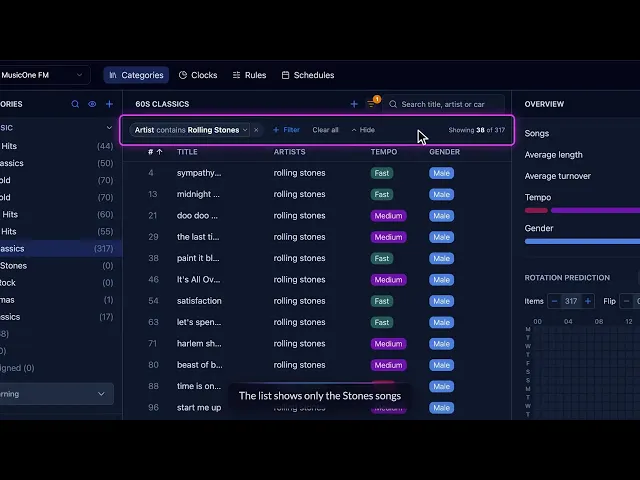
Selection categories allow songs to be in two categories at the same time. They do not hold their own content. Instead, they contain copies of songs drawn from other Music categories. This is useful for special programming. Let’s say you want an All-Stones hour on Saturday night, where you schedule nothing but Rolling Stones. You’d create a selection category that pulls the Stones songs from your regular categories and then call that category in an All-Stones clock. Selection categories follow your rules like any other music category, so exclude that clock from your artist separation rule (see Artist separation rules).
To fill one, tick the songs in their regular category, click Copy to (a folder with a plus) in the bar at the bottom and pick the selection category. Copy to only lists selection and countdown categories, and each song stays in its own category too. In the screenshot I ticked three songs in 70s Classics, and Copy to shows the MusicOne FM selection category, Classics.

Selection categories don’t have to be artist-specific, of course. They can be any grouping of songs that you choose. The songs in a Selection category will have totally separate, unique rotations from what the songs are getting within their regular Music categories.
Countdown
Countdown categories work like Selection categories, but they schedule songs in reverse rank order (so for a top 40, it starts with rank 40 and works its way down to 1). They are also excluded from all rules. Use them for countdown shows, top-five segments, or any programming where the order is fixed and rule enforcement would interfere. When you create one, its type is called Countdown Selection.

Was this helpful?
Related articles