Song and production card overview
What's on an individual song or production card.
Updated
Every song and every production item in your library has a card. It holds what the scheduler needs to place the item and what your playout system needs to play it.
Always fill in tempo and gender. You will have some use for sound codes, though. Those are the fields your rules work with, so they are the ones worth getting right.
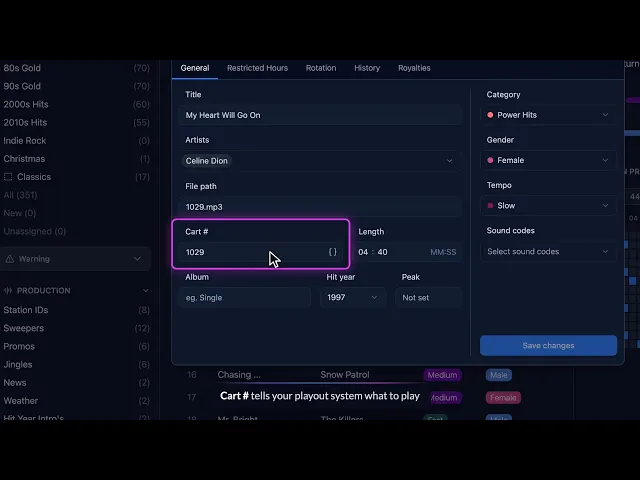
Opening a card
Double click a song in any category to open its card. The tabs along the top are General, Restricted Hours, Rotation, History and Royalties. A production card has a Link tab instead of Royalties. If your station uses Music intelligence, songs get one more tab for it.

The General tab
Title and Artists. The artists are what artist separation looks at. To keep a solo artist and their old band apart, link them, see Linking artists.
File path, Cart # and Length. The cart number is how your playout system knows what to play. With PlayoutONE, for example, that number is what MusicOne puts into the playlist to tell PlayoutONE what to play, and whatever that number is, is what gets played on your station. When your automation software syncs with MusicOne, these three fields come from the automation and are locked on the card. Voice track categories are the exception.
Album, Hit year and Peak. Peak is the song's highest chart position. Hit year is also what hit year stagers are matched on, which Linking tracks explains.
Category. Pick another category here to move the song (see Categories overview).
Gender (Male, Female, Mixed or Instrumental), Tempo (Slow, Medium or Fast) and Sound codes. A song can carry several sound codes, see Sound codes.
The columns icon at the top right of the card, Additional fields, adds Intro / Outro markers to the card, with a Cold or Fade ending. Click Save changes when you're done.

Production cards
There are two kinds of cards: song cards, and cards for everything else, from a jingle to a one-hour program. That second kind is production. A production card has no gender or sound codes. Instead it has three fields of its own.
Dates sets the first and last day the item may be scheduled. For example, a public service announcement for a registration date of January 16th gets an end date of the 15th.
Start tempo and End tempo describe how the item begins and ends, so tempo transition rules can use it (see Transition rules for production). I used to have jingles that started slow and ended fast. If you were segueing from a soft Carole King ballad into a rocker by Bad Company, the Slow-to-Fast Jingle made for a smoother mix in the ear.
If you want artist names on production items, such as artist drops, switch on Artists under Additional fields.
Here I set the Drive Time jingle to start slow and end fast, with an end date of 15 December.

The other tabs
Restricted Hours holds the hours of the week the item may not play. Setting restricted hours on a song covers it. Rotation shows 14 days of schedules hour by hour, and History shows which categories the song has been in and how often it played there. Checking song rotations covers both. Royalties holds Composer, Arranger, Publisher, Label, Catalog Number, ISRC and ISCI. On a production card, Link connects the item to songs, artists, hit years or sound codes, as explained in Linking tracks.
Was this helpful?
Related articles